


Novellair-Your Book Nook
3.31.00K Reviews
App Specs
- Version
- 2.3.6
- Updated On
- License
- Free
- Downloads
- 500,000+
- Developer
- Q- VOR PTE. LTD.
- Categories
- Books & Reference
- Platform
- Android, iOS
Screenshots

 Analysis by AppCompare
I judge a reading app not only by the stories it offers, but by how comfortably different people can find and read them. Novellair-Your Book Nook is an online reading app from Q- VOR PTE. LTD., built around discovering stories and spending time with them on a phone. Its warm presentation makes a friendly first impression, though a welcoming look alone cannot guarantee that every reader will find the controls comfortable or the catalog a good fit.
Readability and finding your way around
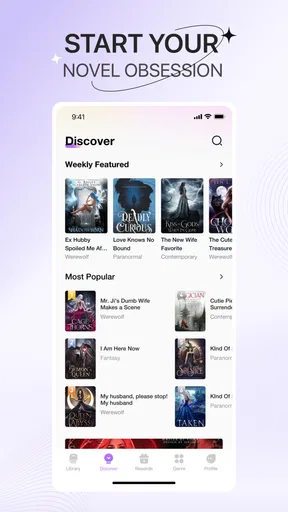
In my experience, the clearest strength is the emphasis on making reading feel approachable. Browsing by genre gives me a useful starting point when I know the kind of mood I want but not the title. That is different from opening a general-purpose e-book reader, where I usually need to bring my own books or search across a collection I have already assembled. Here, discovery is part of the experience rather than a separate chore.
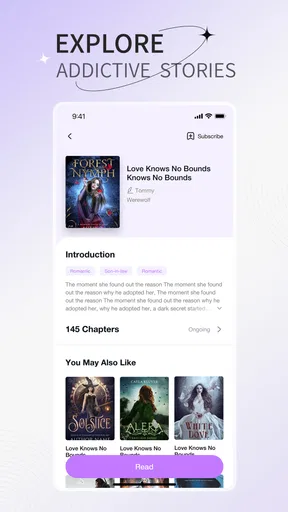
Personalized recommendations can help once I have spent time reading, but I would treat them as suggestions, not as a substitute for browsing. A practical approach is to use recommendations to find one promising title, then return to genre browsing when they start to feel repetitive. That gives the app a chance to surprise me without letting one narrow reading streak define every future suggestion.
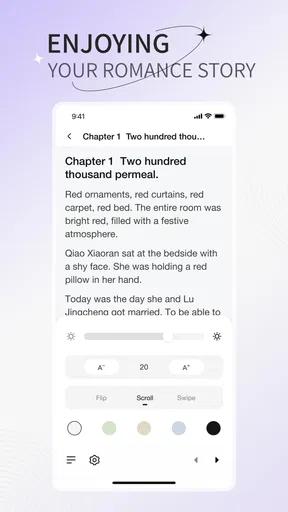
Reading comfort matters just as much as finding a book. The existing reading options include adjustments for font size, background color, and line spacing, so I can try changing one setting at a time rather than making several changes and losing track of what helped. If a page feels crowded, increasing line spacing may be worth trying before enlarging the text substantially; if the lines still feel difficult to follow, a larger font may be the more useful adjustment.
The built-in dictionary is a small but helpful part of this reading flow. Looking up an unfamiliar word can keep me with the passage instead of sending me to another app and making it easy to lose my place. Readers who are learning English, meeting specialized vocabulary, or simply encountering an unexpected word may especially appreciate that convenience.
How it fits into real reading routines
I use this section to think about how Novellair can fit around the small gaps in a day, rather than treating reading as something that needs a long, uninterrupted stretch. A useful habit is to choose a story when you have time to browse, then keep your next reading session focused on the text itself. That routine also makes it easier to notice whether the app’s reading controls work comfortably for you.
Motor and sensory considerations
Changing font size, color, and spacing gives readers some control over the visual presentation, which is a meaningful advantage over a fixed-page experience. Night mode can also be useful when I read in a dim room. Still, these settings address only part of accessibility. Someone who relies on screen readers, voice control, switch access, or a particular contrast standard should test the app directly on their device before depending on it for regular reading.
Worth Reading Before You Choose

EA SPORTS FC Mobile 26 Is a Bigger Football Game, but It Takes Time

Flipboard Shows What News Apps Must Do Beyond the Feed

Switching to Android Auto Means Rethinking Your Driving Routine

Google Calendar Makes a Crowded Week Easier to Manage

Ludo King Makes the Most of the Minutes Between Plans

Baby Panda World Brings Quick Play to Modern Phones, but Its Game Library Feels Busy
There is also a practical difference between visual comfort and reduced eye strain: a darker background may feel nicer in the evening, but it does not make a long session effortless for everyone. I would take short breaks and adjust brightness on the device as well as choosing an in-app theme. For readers sensitive to motion or busy screens, the best test is to open a story and spend a few minutes moving between its pages and the surrounding browsing areas, rather than judging accessibility from the reading screen alone.
People with limited dexterity may want to check how reliably they can select text for the dictionary and move through the app using their preferred controls. A tap-based shortcut can be convenient, but the same action may be awkward for someone who has difficulty making precise taps. This is a case where a quick hands-on trial is more useful than assuming that a simple interface will work equally well for every person.
When and where it works best
A realistic use for this kind of app is a short commute: before leaving home, I can choose a story while connected, then use offline reading during a stretch with weak or unavailable internet. That preparation matters. I would not wait until boarding a train or settling into a flight to decide what to read, because finding and preparing a book is easier when I have a reliable connection.
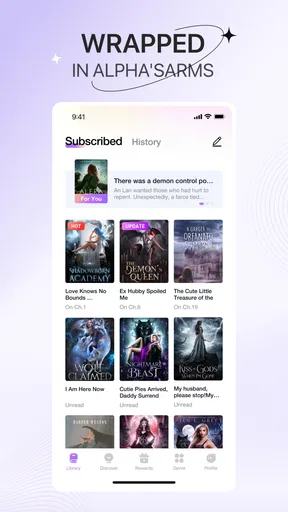
Offline reading is also useful for a weekend away, but it is worth thinking ahead about storage and what I genuinely plan to read. Downloading more titles than I need can make a mobile library feel cluttered, while keeping one current story ready makes it easy to pick up the phone for a few spare minutes. If I use more than one device, the sync feature is intended to carry reading progress, bookmarks, notes, and highlights between them; I would still check that a recent change has synced before switching devices in the middle of a chapter.
For a busy reader who can only manage a few pages at a time, the useful question is whether the app makes returning to a story feel straightforward. Saved progress and the option to read offline support that habit. By contrast, someone who prefers a physical book for focused, screen-free reading may find that a phone introduces too many interruptions, regardless of how convenient the digital library is.
Stories, discussion, and the trade-offs
Community features add a social option that a basic e-book reader often lacks. Book clubs, discussions, and following authors can make reading feel less solitary, particularly when I want to compare interpretations or see how other readers react to a turning point. The trade-off is that discussion is not part of the story itself: if I am trying to avoid spoilers, I would finish the relevant section before opening a conversation, and I would skip community areas when I want an uninterrupted reading session.
Compared with buying or borrowing individual e-books through a conventional bookstore or library service, Novellair puts more emphasis on discovering stories inside a reading platform. That can suit readers who enjoy browsing and trying unfamiliar genres. A dedicated e-reader or a library app may be a better match for someone who already has a large collection, wants a familiar borrowing workflow, or prioritizes a device designed specifically for long reading sessions.
The app is free to download, but it includes in-app purchases ranging from $0.99 to $284.99 per item. I would check what an item costs and what it unlocks before confirming any purchase, especially if I am exploring casually and do not yet know how much I will use the service. The presence of optional purchases does not tell me whether a particular story is available without paying, so it is sensible to inspect the choices shown in the app rather than assume every title follows the same arrangement.
Who is likely to enjoy it?
I can see this working well for readers who like serial discovery, want genre-led browsing, and enjoy the possibility of discussing a story with other people. It may also appeal to someone who reads in brief pockets of free time and values having stories available on a phone. Its Teen content rating is a useful signal for families and younger readers, but I would still consider an individual reader’s preferences and the specific story before recommending titles.
Readers who want a strictly distraction-free tool, a screen-reader experience they already know works for them, or a catalog centered on books they personally own may prefer another option. The average rating is 3.7 from around 3.9 thousand ratings, and the app has over 500 thousand installs; those figures suggest a meaningful audience, but they cannot tell me whether its reading flow will suit a particular person. The most useful test is whether browsing, reading controls, and any purchase choices feel comfortable on your own device.
For someone deciding whether to try it, I would start with a free session: browse a couple of genres, open a story, adjust the display, and see whether the text remains comfortable after more than a quick glance. Then test the dictionary on a word you do not know and consider whether community features are a welcome addition or a distraction. That brief trial answers more practical questions than judging the app by its cover art or recommendations alone.
Its current version is 2.1.9 and it runs on Android 6.0 or later. Those details make it easier to check basic device compatibility before installing, while the reading experience itself still deserves a personal trial. Overall, I see a story-discovery platform with useful reading adjustments and social features, balanced by the need to check purchases, test accessibility needs, and decide whether phone-based reading suits your routine.
A Library at Your Fingertips
One of the coolest features is the vast selection. We’re talking thousands of novels, from the latest bestsellers to hidden gems you’d never stumble upon otherwise. The app smartly categorizes everything, so whether you’re in the mood for a spine-chilling thriller or a heartwarming romance, it’s all just a tap away.
But what really caught my attention was the way Novellair curates personalized recommendations. It’s like having a personal librarian who knows your taste to a T. After reading a few books, the app started suggesting titles that were right up my alley, and I found myself hooked on genres I’d never considered before.
Reading Experience Like No Other
Now, let’s talk about the reading experience itself. The app offers customization galore. You can tweak font sizes, background colors, and even line spacing to suit your reading comfort. Personally, I love the night mode; it’s easy on the eyes during those late-night reading marathons.
Another nifty feature is the built-in dictionary. Come across a word you don’t know? Just tap it, and voilà, the definition pops up. It’s a small detail, but it makes the reading experience seamless and engaging.
Community and Connection
What sets Novellair apart is its sense of community. You can join book clubs, participate in discussions, and even follow authors to get the latest updates on their work. It’s like having a book club in your pocket, where you can connect with fellow book lovers anytime, anywhere.
One of my favorite moments was joining a discussion about a plot twist that left me reeling. Sharing theories and insights with others who were equally invested was half the fun!
Offline Access and More
Of course, we all have those moments when Wi-Fi is nowhere to be found. Thankfully, Novellair lets you download books for offline reading. It’s perfect for those long flights or weekend getaways where you just want to unplug and dive into a good read.
Plus, the app’s sync feature ensures that no matter which device you’re on, you’ll always pick up right where you left off. Your bookmarks, notes, and highlights follow you, making transitions between devices a breeze.
Final Thoughts
In a nutshell, Novellair-Your Book Nook has transformed the way I read. It’s convenient, community-driven, and packed with features that cater to bookworms of all sorts. Whether you’re a casual reader or a literary aficionado, this app has something special to offer.
If you’re ready to explore new stories and connect with fellow readers, give Novellair a try. I guarantee it’ll become your go-to book nook, just like it has for me.
Pros
- User-friendly interface boosts reading experience.
- Wide selection of genres and authors available.
- Offline reading mode for convenience on-the-go.
- Personalized recommendations enhance discovery.
- Regular updates with new features and content.
Cons
- Limited customization for text appearance.
- Occasional syncing issues across devices.
- Some features require a premium subscription.
- Ads can interrupt the reading experience.
- Limited social features for reader interaction.
FAQs for Novellair-Your Book Nook
What is Novellair and how does it work?
Novellair is an innovative app designed for book lovers, offering a unique platform to discover, read, and discuss a wide variety of novels. Users can browse a vast library, access book summaries, and join community discussions. The app also provides personalized recommendations based on reading preferences, making it a comprehensive tool for avid readers.
Is Novellair free to use, or are there any in-app purchases?
While Novellair offers a free version with access to a selection of books and features, there are optional in-app purchases. These purchases allow users to unlock premium content, exclusive novels, and advanced features like offline reading. Subscription options are available for users who want an ad-free experience and access to the full library.
What are the main features of Novellair?
Novellair boasts a range of features including a vast library of novels, personalized book recommendations, and a vibrant community forum for discussing literature. The app also offers reading challenges and the ability to track your reading progress. Users can enjoy customizable reading modes and offline access to favorite books with a premium subscription.
How can I ensure my data is secure while using Novellair?
Novellair prioritizes user privacy and data security. The app employs robust encryption methods to protect user information and transactions. Additionally, users can manage their privacy settings within the app, ensuring personal data is only shared according to their preferences. Regular updates are made to enhance security protocols.
Can I use Novellair offline?
Yes, Novellair offers offline reading for users who subscribe to the premium version. This feature allows you to download books and read them without an internet connection, making it convenient for reading on the go. However, certain features like community discussions and real-time recommendations require an internet connection.


